Ladder
The winner moves one table up, the loser one down. The players run the ladder and confirm each other's games; the games go into the rating when the ladder finishes.
A ladder is a club-night format. The tables are lined up in order, the first one is the top. After a game the winner moves one table up and the loser one table down. The goal is to reach the first table and hold on to it. Latecomers join at the last table.
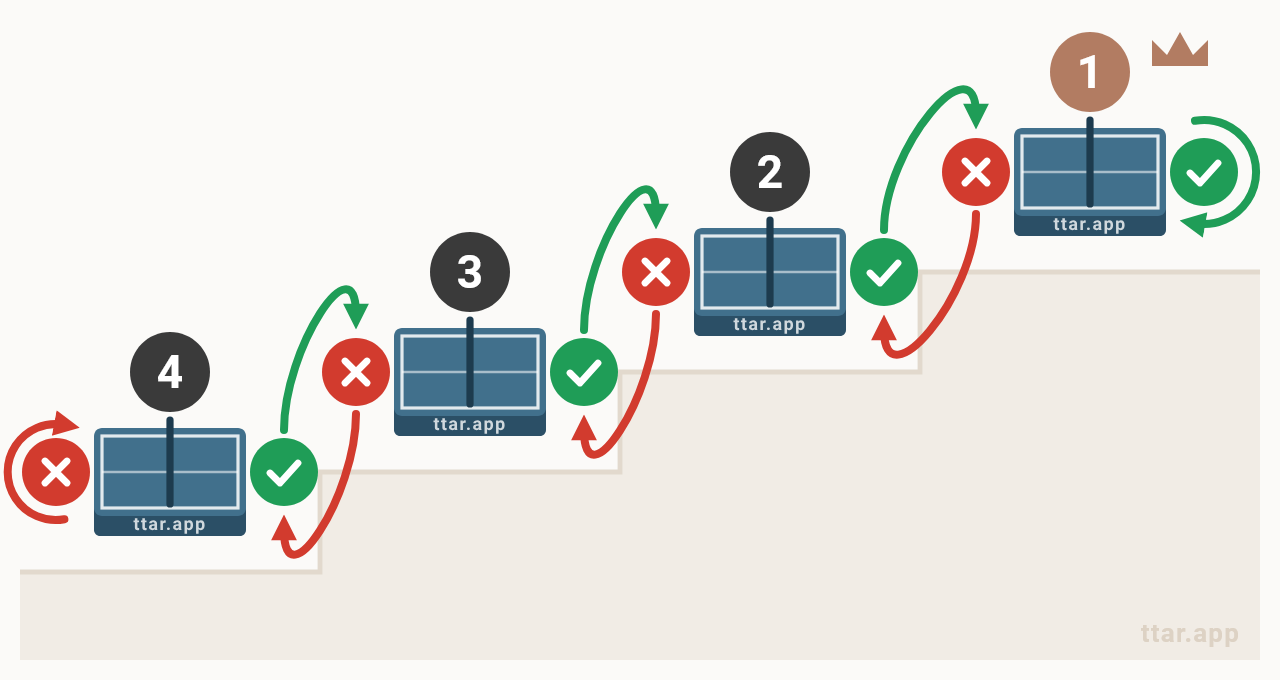
In TTAR the ladder is run by the players themselves for now: who plays at which table and when to move, you decide on the spot. The organizer publishes the announcement with the rules and gathers the participants, but doesn't pair players or enter scores.
Rules
| Setting | What it means |
|---|---|
| Sets per game | How many sets are played — all of them, not "best of N". A set is played to 11 points. |
| With deuce | At 10:10 play goes on until one side leads by 2 points. |
| No deuce | At 10:10 the 11th point decides the set. |
| Tiebreak rally | Only with an even number of sets. If the sets are split (1:1, 2:2), a tiebreak rally to a 2-point lead decides who moves up. It doesn't count as a game: the rating gets a draw. |
| No move | On a draw in sets both players stay at their tables; the rating gets a draw. |
| Even roster only | With an odd number of players one is always left without an opponent: they wait at a table, the moves get out of step, and those who wait play less. With this setting, before the start, a player without a pair goes to the waitlist and joins the roster automatically when the next player signs up. Once the ladder runs, players join one by one. |
Joining and leaving
You can join the ladder and leave it until it is finished; latecomers enter at the last table. To leave, tap "Leave" in your row on the "Participants" tab. A player who left disappears from the list of participants, but the games already recorded stay: they can still be confirmed and go into the rating when the ladder is finished. You can come back at any time before the finish. The organizer can take a player off too — the games stay just the same, but such a player can't come back on their own.
How to enter games
One of the pair records the game, the other confirms it on their side. There are two ways to record — and you can combine them:
- One at a time, right after the game. Tap "Record a game", pick the opponent from the ladder's participants and the score in sets — the game goes to the opponent for confirmation at once. They see it in the "Confirm games" block and confirm it or reject it: "didn't play", "wrong score", "duplicate".
- Keep the score for everyone at once. In the "Several games" window on the Games tab, enter the games with all your opponents and send them for confirmation with one button. A game with an opponent is added by the rules template ("+2:0", "+1:1"…) or as a custom score — e.g. the sum of the sets of several meetings. Every game you enter is added to the ones recorded earlier.
While the ladder runs, confirming a game doesn't change the rating — the games are registered for the rating recalculation when the tournament finishes.
Finishing the ladder
Before finishing, make sure everyone has entered their games: after that no new games can be added to the ladder. When finishing, the organizer chooses how the games are registered:
| Mode | What goes into the rating |
|---|---|
| A total for each pair (default) | One game with each opponent — the sets of all the meetings: 1:0, 0:1 and 1:0 → one game 2:1. |
| As the players entered | Every confirmed record as a game of its own, with the score it was entered with; a custom score is one game too. |
The confirmed goes into the rating at once. Unconfirmed records become ordinary unconfirmed games — the opponent confirms them under "Unconfirmed", and the rating is recalculated at the moment of confirmation. Unconfirmed, such a game expires in 3 days, like an ordinary one. If the organizer turned on auto-confirmation, the game counts automatically after the set time from the finish — unless the opponent explicitly rejected it.